
Save • Organize • Find
Save: From mobile, web, and the Chrome extension— one tap. Organize: Drag & drop, Pin, Favorites, and Stacks with zero friction. Find: One box to Google-search or open a URL directly— plus instant preview.
turns your saved links into a smart, organized library.
AI improves titles, descriptions, previews, and gives instant summaries—so you find and understand content faster.
Study, work, or collect resources… everything stays clear and in one place.



Feature you need
nothing you Don't

Save: From mobile, web, and the Chrome extension— one tap. Organize: Drag & drop, Pin, Favorites, and Stacks with zero friction. Find: One box to Google-search or open a URL directly— plus instant preview.

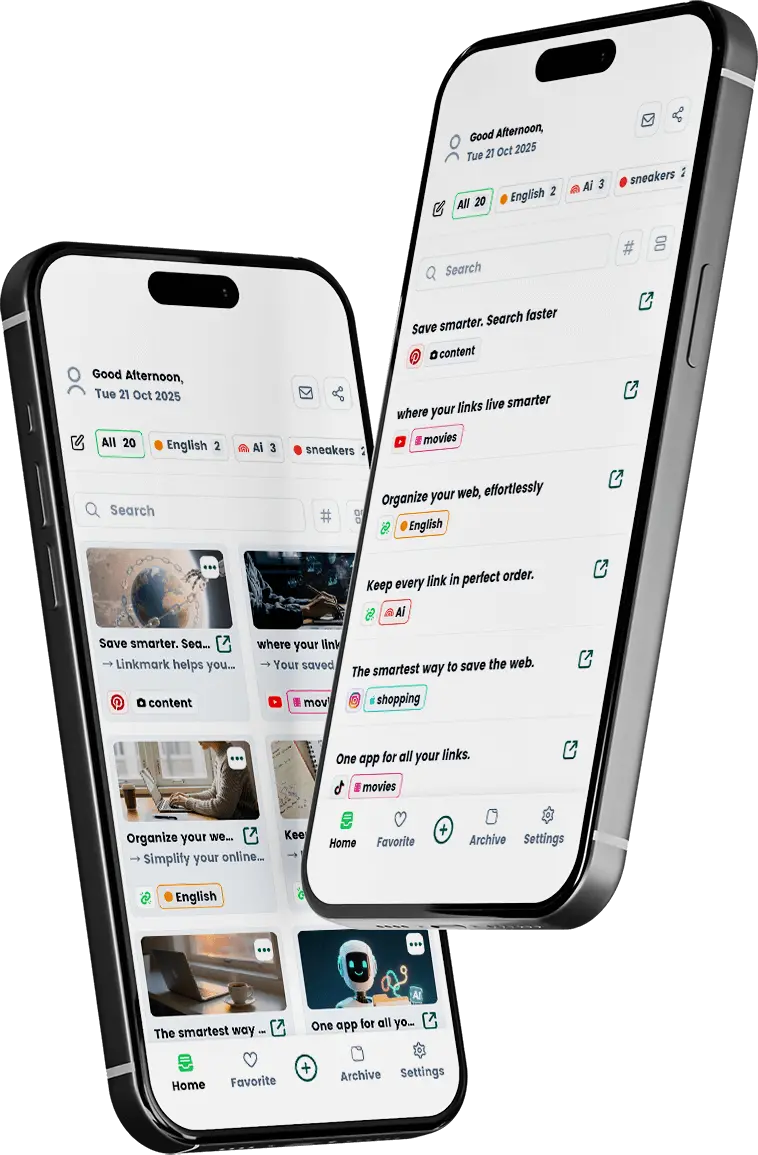
We auto-generate a clean title and concise description so every card looks sharp and swimmable.

Before/after in a snap: the same links—now neatly summarized with an in-app reader.

One account everywhere. Save once, access anywhere — perfect sync across all your devices.

We rewrite titles, clean up descriptions, and present every link beautifully—automatically.
Your original links stay untouched—every change is reversible.
ai clean titles better for like links yeah messy fix.

Imagine never losing another.
LinkMark offers a sophisticated.
Streamline your digital life with ....
Reorder cards freely; respects pinned items; syncs across devices. "Tap-hold then drag to move."
Slide left or right on any card for instant actions (delete, pin, favorite, archive) "Swipe for quick actions."
Move finished links to Archive without losing them— restorable anytime. "Put It Away—Find It Later"
Organise your links make it on cards or lists.
Instant link search that finds fast.
and enhance your links with AI.
Remove what you don't need w, keep your workspace focused and light. "Clear It Out"
Turn any link into a favorite.Mark to keep your links always within reach. "Favourite for Fast Access"
Keep priority links always on top. Pinned items stay visible across views. "Pin to top"
See your saved links your way switch between list, card, or image views and use smart filters to find anything fast.
Organise & Access Your Links
Open and read the full content of your saved links without leaving LinkMark articles, videos, images, and more.
Search Google right inside LinkMark, or paste a URL to open/preview it instantly—no tab switching.
Set a reminder when you save or edit a link. Pick a date/time and we’ll nudge you at the right moment—plus a one-tap Snooze.
Browse the most common questions.
Most apps just save your links… then leave you to deal with the mess.
LinkMark turns every link into a “knowledge card” you can actually use:
So instead of bookmark chaos, you get a clean library that helps you study, work, and research faster.
Whether you have dozens, hundreds, or even thousands of links, LinkMark is built for that moment.
And the best part? LinkMark suggests related links and similar content, so organizing feels like a quick, simple task—not a chore.
AI in LinkMark isn’t a side feature—it’s the core of the experience:
In other words: you don’t have to remember the exact wording—just the idea. LinkMark finds the right link for you.
AI in LinkMark isn’t a side feature—it’s the core of the experience:
In other words: you don’t have to remember the exact wording—just the idea. LinkMark finds the right link for you.
The Free plan gives you everything you need to start using LinkMark:
The Premium plan is for people who rely on LinkMark every day for study or work:
Start free. If you find yourself using LinkMark for every project, subject, or workday, upgrading to Premium will save you time and effort every single day.
No matter where you work, LinkMark goes with you:
One library, always in sync, always up to date—ready whenever and wherever you need it.